
Nonprofit accounting software: income, expenses, budgets and financial reports
Kananas is nonprofit management software that helps your organization track income, expenses, budgets and accounting documents from one central platform.
Membership dues, donations, online payments, reimbursements, purchases, check deposits, bank transactions or year-end financial reports: Kananas centralizes your nonprofit accounting to save time, reduce errors and make the treasurer’s work easier.

Tested and approved by over 11,000 clubs. Free for up to 50 members · 30-day trial · No credit card required

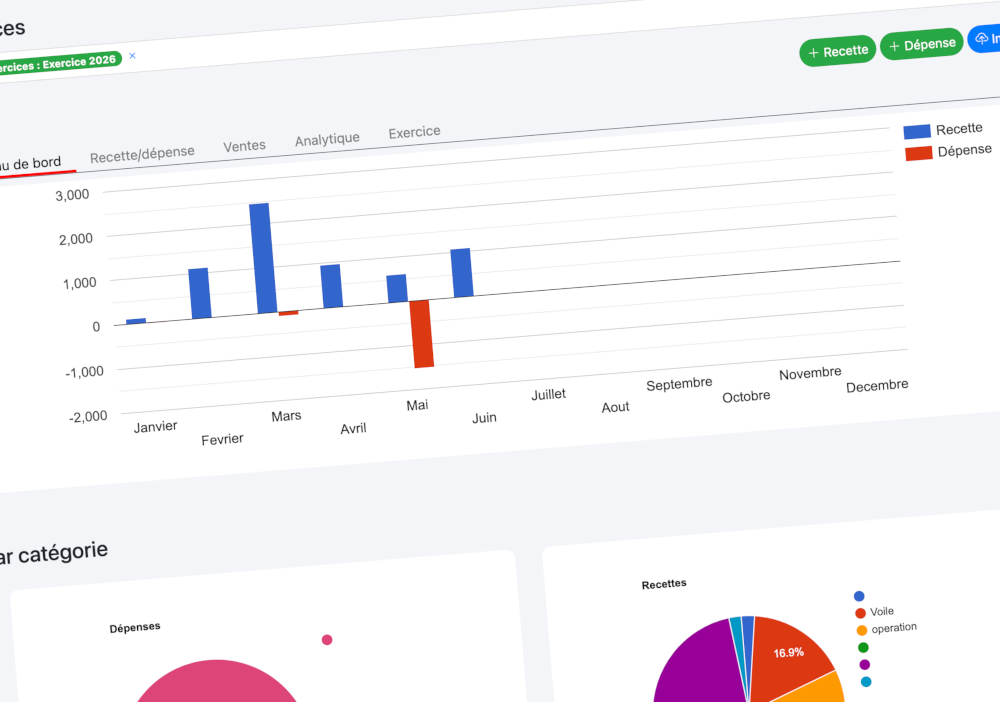
How can Kananas help manage nonprofit accounting?
Kananas helps nonprofits manage accounting by centralizing financial transactions in a clear journal: income, expenses, payment methods, bank accounts, cash, categories, tags, fiscal years and budgets.
The accounting operations module helps you record, search, filter and review your organization’s financial activity, making accounting more reliable and easier to use.
A complete tool to track your nonprofit’s finances
Kananas turns financial tracking into a real management tool: record, import, categorize, review and analyze transactions without relying on multiple spreadsheets.
💵 Track income and expenses
Record membership dues, donations, grants, reimbursements, purchases, bank fees and payments to maintain a clear chronological financial journal.
🏦 Import bank statements with AI
Import a CSV file exported from your bank to speed up bank transaction entry and reduce the risk of missed or duplicated data.
📊 Prepare financial reports
Generate financial statements and budget reports to prepare board meetings, annual meetings and discussions with donors, grantmakers or funders.

How do you import a bank statement into Kananas?
Manually entering bank transactions is often one of the most time-consuming tasks for a nonprofit treasurer. With Kananas, you can import a bank statement in CSV format to quickly retrieve transactions from your organization’s bank account.
Kananas uses artificial intelligence to analyze statement lines: dates, descriptions, amounts, references and additional details. The goal is to prepare useful accounting information for the treasurer while keeping final control in their hands before validation.
- Import CSV files exported from your bank
- Analyze dates, descriptions, amounts and references
- Suggest accounting accounts and categories
- Link transactions to existing contacts when relevant
- Identify income and expenses
- Detect possible duplicates before validation
- Prepare entries faster
- Keep final review under the treasurer’s control
Organize your accounting transactions with precision
Kananas helps your nonprofit maintain structured accounting: every transaction can be tracked, categorized, filtered and reviewed according to your organization’s needs.

📒 Transaction journal
The journal lets you view all accounting transactions for your nonprofit: income, expenses, payments, reimbursements, transfers and cash movements.

🏷️ Tags and categories
Accounting tags help you mark specific transactions: check to deposit, transaction to review, project-related expense or any special accounting item.
✅ Entry validation
A transaction can be reviewed and validated, for example after checking it against the bank statement. This helps prevent accidental changes to entries that have already been reviewed or reconciled.

🏦 Bank accounts and cash
Separate transactions by source: main bank account, petty cash, secondary account or any other account used by your nonprofit.

Prepare your nonprofit financial statements
At the end of the fiscal year, nonprofit leaders need to present a clear financial overview to members, the board, donors, grantmakers or the annual meeting.
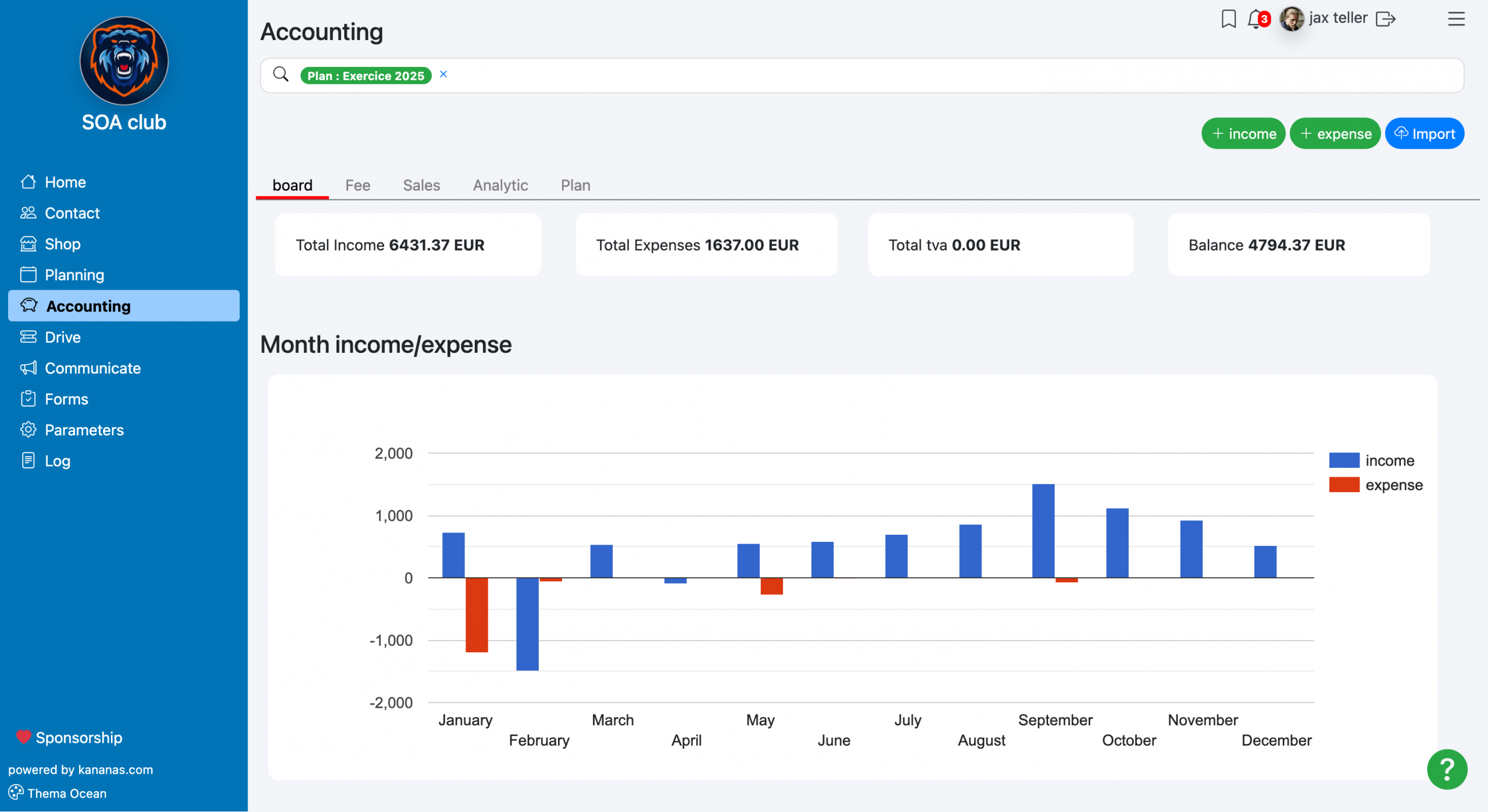
With Kananas, data entered in the financial journal can be used to generate financial statements that help your organization understand its financial position and annual activity.
📌 Statement of financial position
View your nonprofit’s financial situation at a specific date: cash, receivables, liabilities and available resources.
📈 Statement of activities
Analyze revenue and expenses for the fiscal year to understand whether your nonprofit ended the period with a surplus or deficit.
🎯 Budget tracking
Compare your budget forecasts with actual recorded transactions to better manage your organization’s resources.
Why replace spreadsheets with real nonprofit accounting software?
Spreadsheets may be enough when a nonprofit is just getting started, but they quickly become limiting as activity grows. Files are shared between multiple people, versions multiply, formulas can be changed by mistake and transactions often need to be entered manually.
With Kananas, accounting is connected to your member database, membership dues, payments, activities and financial documents. Your organization gains efficiency, reliability and visibility.
- Less manual data entry
- Fewer accounting errors
- Fewer duplicate transactions
- A clearer financial journal
- Transactions linked to members and contacts
- Easier financial statement preparation
- Simpler budget tracking
- A more secure fiscal year close
Frequently asked questions about nonprofit accounting with Kananas
Can Kananas track nonprofit income and expenses?
Yes. Kananas lets you record income and expenses in a financial journal, with details such as description, amount, payment method, account and category.
Can I import a bank statement?
Yes. Kananas lets you import a CSV file exported from your bank. The tool analyzes transactions and prepares useful accounting information before validation.
Is the bank import fully automatic?
Kananas can analyze the bank file and suggest accounts, categories or contacts. The treasurer keeps control and should review the suggestions before validation.
Can Kananas help avoid duplicate transactions?
Yes. During bank statement import, Kananas can look for similar transactions already in the system to help reduce duplicates.
Can I manage multiple fiscal years?
Yes. Kananas lets you create and manage multiple fiscal years, with a start date, end date and label adapted to your organization’s accounting calendar.
Can I track a nonprofit budget?
Yes. You can define budgets by account and track actual activity to compare forecasts with recorded transactions.
Can Kananas generate financial statements?
Yes. Kananas can generate financial reports from the financial data entered in the application, including statements that help you present your nonprofit’s financial position and activity.
Can I prepare check deposits?
Yes. Kananas can generate a check deposit slip from selected transactions in the financial journal.
Can I close a fiscal year?
Yes. Kananas lets you close a fiscal year to prevent changes or new transactions from being added to a closed accounting period.
Optimize your time, boost your association with Kananas
Register for free on Kananas and enjoy a 30-day trial without a credit card.