
Nonprofit scheduling software: activities, online registration and attendance tracking
Kananas is nonprofit management software that helps you create activities, open online registration, track participants, check people in and analyze attendance from one central platform.
Recurring classes, workshops, camps, field trips, board meetings, public events or member-only programs: Kananas centralizes the organization of your nonprofit, club or member-based organization without spreadsheets, duplicate data entry or scattered tools.

Tested and approved by over 11,000 clubs. Free for up to 50 members · 30-day trial · No credit card required

How can a nonprofit manage activities with Kananas?
Kananas helps nonprofits, clubs and member-based organizations manage activities by centralizing every key detail in the calendar: title, date, time, location, organizer, participants, fees, capacity, registration rules and publication status. Each event can be public, restricted to members or limited to specific member groups.
The activities and events module works for one-time events as well as recurring programs: weekly classes, practices, workshops, camps, field trips, meetings, conferences, office hours or volunteer sessions.
Members can register through their member portal.
A complete nonprofit calendar to organize every event
Kananas turns your nonprofit calendar into a real management tool: create, publish, track and analyze your activities without multiplying spreadsheets, forms and disconnected tools.
📅 Create activities
Add classes, workshops, meetings, field trips or events with all the information your team needs: date, location, time, organizer, fee, participants and maximum capacity.
🔁 Schedule recurring events
Plan an activity that repeats weekly, every other week or monthly. This is ideal for a sports season, school-year program, workshop series, training schedule or recurring class.
🔐 Restrict access to selected audiences
Limit registration to a member category, group, team, chapter or people who purchased a specific option. You stay in control of registrations, capacity and eligibility.
How do you open online registration for your activities?
With Kananas, members can view available events and request registration from their member portal. When an activity is open, it can be published online with its practical details, registration rules and optional fee.
The online event registration feature helps reduce email requests, paper forms and manual re-entry. Registration information flows directly into Kananas, ready for your team to approve, manage and track.
- Publish activities open for registration
- Registration requests from the member portal
- Optional connection to a fee or payment
- Status tracking for each request
- Approve or decline registrations
- Automatic notifications to participants
- Capacity limits and waitlist-style follow-up
- Centralized data for reporting
How do you manage participants for an activity?
Kananas centralizes the participants for each event, whether they are added manually by your organization or registered directly through their member portal.
🧩 Groups and sessions
Organize participants by team, level, age group, chapter, time slot or instructor. For recurring activities, a member can be registered for one session, several sessions or the full program.

📧 Targeted communication
Send an email to the participants of an activity to confirm a registration, share instructions, announce a schedule change or notify them of a cancellation.


👥 Registrant list
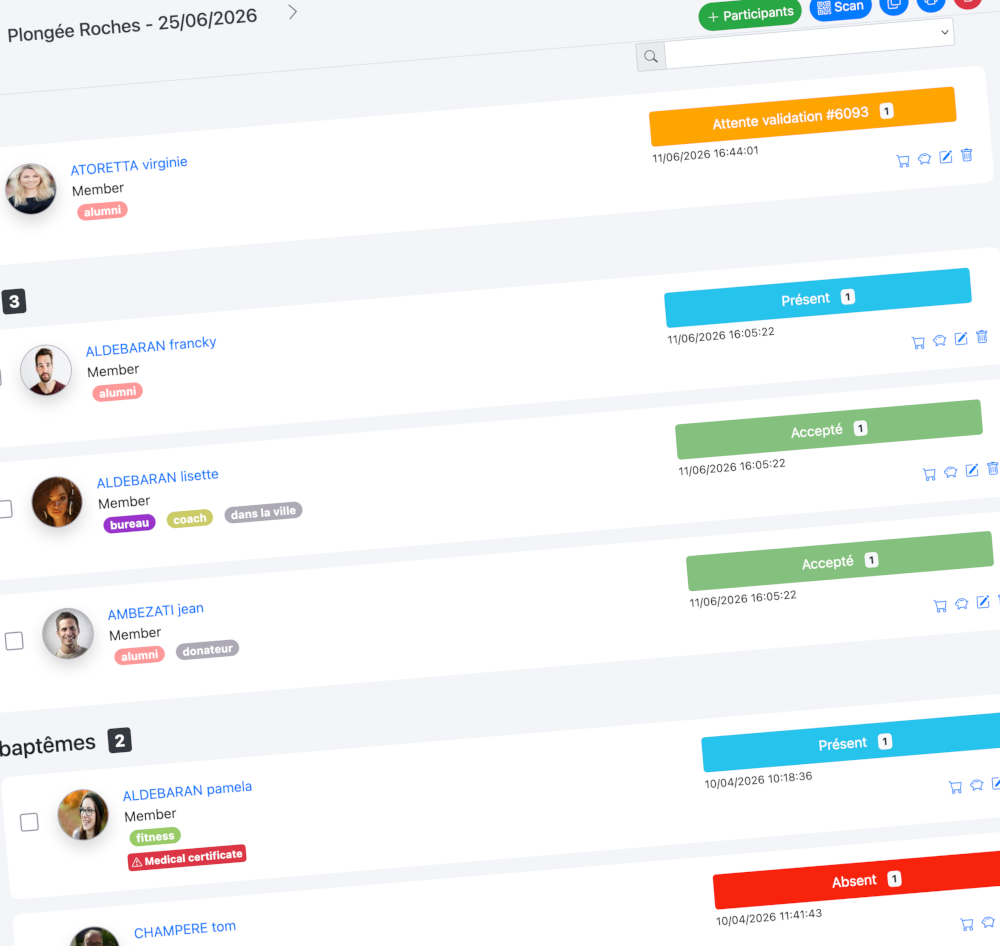
The participants tab lets you view every person attached to an activity: registered, present, absent, excused, canceled or waiting for approval.

🏷️ Custom statuses
Track every step of the participant journey: pending, approved, declined, awaiting payment, present, absent, excused or canceled. Your team can immediately see where each participant stands.
Check in attendees with a QR code
For events that require check-in at the entrance, Kananas lets you use the membership card and its QR code. A participant can show a printed card, an email version or a card displayed on a smartphone. Your team scans the QR code from a phone or tablet to verify that the person is registered for the activity.
The event check-in feature then lets you quickly mark the participant as present or deny entry if the person is not registered.
- Fast check-in for events, classes, workshops or camps
- Registration verification from a smartphone or tablet
- Reliable tracking of attendance and absences
- Fewer paper lists and fewer check-in errors

Analyze participation and attendance statistics
The Kananas calendar is not only used to organize activities. It also helps you understand what works through participation and attendance statistics.
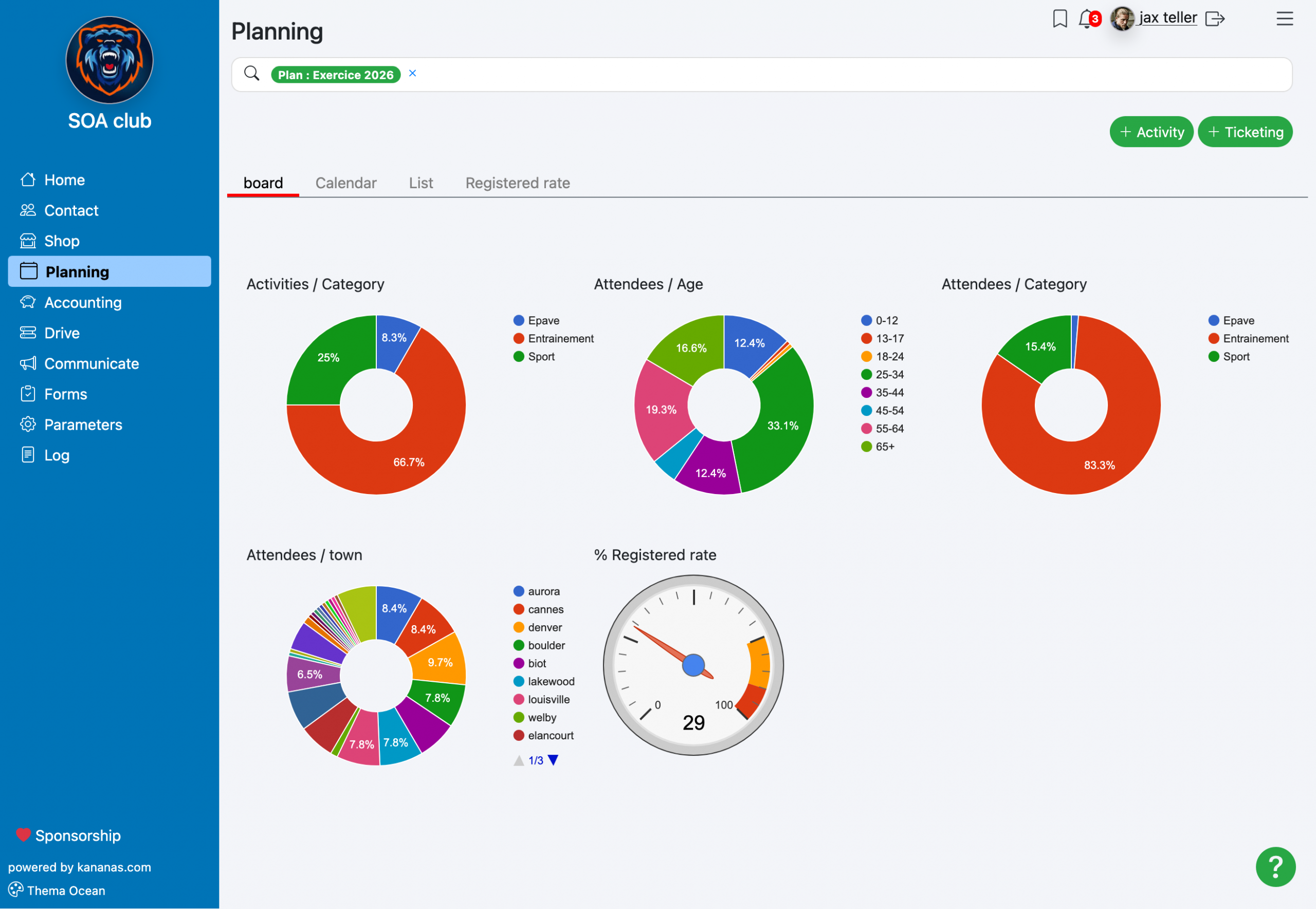
The participation statistics help nonprofit leaders manage programs with more reliable data: attendance by category, age group, location, period or fill rate.
📊 Attendance
Track the number of participants by activity, category or time period to identify your strongest events and the programs that need more promotion.
🎯 Participant profiles
Analyze distribution by age, category, event type or city of residence to better understand your audience and adapt your programming.
📈 Fill rate
See which activities are underfilled or in high demand so you can adjust capacity, time slots, staffing and communication.
Why replace spreadsheets with real nonprofit scheduling software?
Spreadsheets may work at the beginning, but they quickly show their limits when your number of members, activities and team leaders grows. Files multiply, versions diverge, registration data is entered several times and reporting becomes difficult to trust.
With Kananas, your calendar is connected to your member database, online registration, payments, communications and statistics. You save time while improving the quality of your follow-up.
- Less manual data entry
- Fewer errors in registration lists
- Better visibility into available spots
- Better-informed participants
- Faster event check-in
- Actionable attendance statistics
- More reliable attendance tracking
- A more professional organization
Frequently asked questions about nonprofit scheduling software
Can Kananas create recurring activities?
Yes. Kananas lets you create activities that repeat weekly, every other week or monthly over a defined period. This is ideal for regular classes, practices, workshops, meetings or programs.
Can members register for activities themselves?
Yes. Members can request registration from their member portal when an event is open for online registration.
Can we limit the number of available spots?
Yes. Kananas lets you define a maximum capacity for an activity. Once the limit is reached, registrations can be restricted to avoid overbooking.
Can we manage paid activities?
Yes. An activity can be linked to a fee. A member can then select the corresponding service and pay online if online payment is enabled for your organization.
Can we message activity participants?
Yes. From the participant list, your organization can send an email to people registered for an activity. This is useful for confirmations, reminders, practical information or schedule changes.
Does Kananas support event check-in?
Yes. Kananas lets your team scan the QR code on a membership card from a smartphone or tablet to verify registration and mark the participant as present.
Can we analyze participation in our activities?
Yes. Kananas provides participation statistics to track events, participant profiles, fill rates and attendance trends over time.
Optimize your time, boost your association with Kananas
Register for free on Kananas and enjoy a 30-day trial without a credit card.