
Importing a bank statement allows you to quickly add your organization’s bank transactions to your Kananas accounting records.
Instead of manually entering every income or expense transaction, you can import a CSV file exported from your bank’s online portal. Kananas AI then analyzes the file, searches for potential duplicates, and automatically suggests the relevant accounting information: account, category, and associated contact.
This feature saves a significant amount of time, especially for nonprofits and membership organizations that process a large number of payments, membership dues, reimbursements, purchases, or bank transfers.
1. Export the CSV file from your bank
The first step is to download your bank transaction file from your bank’s online portal.
Log in to your online banking account, then export the account transactions in CSV format.
Depending on your bank, the file may contain different columns, such as:
- transaction date
- bank transaction description
- amount
- transaction type
- reference number
- payment method
- account balance
- payer or payee name

The file does not need to use exactly the same format from one bank to another. Kananas AI is designed to analyze the file content and identify the relevant information.
Before importing the file, simply verify that it contains the transactions you want to add and that the exported date range matches your needs.
2. Access the import feature in Kananas
In Kananas, open the Finances menu, then click the Import button.
You can then select the CSV file exported from your bank and attach it to the import.
Once the file has been added, Kananas analyzes its content and prepares the accounting entries.
3. How Kananas AI analyzes the file
After the CSV file is uploaded, Kananas uses artificial intelligence to analyze the bank transactions.
The AI reads the information available in the file, including dates, descriptions, amounts, references, transaction types, and any additional data provided by the bank.
Its purpose is to transform a raw bank file into accounting entries that are easier to review and process.
The AI can help you:
- identify income and expenses
- interpret bank transaction descriptions
- suggest a general ledger account
- suggest a category
- link a transaction to a contact
- identify previously recorded transactions
- prevent duplicate entries
- prepare transactions for approval
This analysis eliminates much of the manual work that is usually required after exporting transactions from a bank account.
4. Duplicate detection in your database
During the import, Kananas compares the transactions in the file with the transactions already recorded in your database.
This step is important because it helps prevent the same transaction from being imported more than once.
For example, if you have already manually entered a membership payment, reimbursement, or expense, Kananas can detect that a similar transaction may already exist.
Duplicate detection can use several criteria:
- transaction date
- amount
- transaction description
The goal is to make the import more reliable and prevent accounting errors caused by duplicate transactions.
5. Automatic general ledger account suggestions
Kananas AI can suggest a general ledger account for each imported transaction.
It uses the transaction information as well as previously recorded transactions in your organization.
For example, if a specific bank description has already been associated with membership dues, insurance, facility rental, a reimbursement, or an equipment purchase, Kananas can use that history to suggest a consistent account during future imports.
This process gradually improves the relevance and consistency of the suggestions.
Examples include:
a membership payment may be assigned to an income account
an insurance payment may be assigned to an expense account
an equipment purchase may be assigned to a purchasing category
a reimbursement may be identified as an expense or adjustment
a donation may be recognized as a specific type of income
All suggestions should be reviewed by the user before approval, but they can significantly reduce manual data entry.
6. Automatic category suggestions
In addition to the general ledger account, Kananas can suggest a category for each transaction.
Categories make your day-to-day financial reporting easier to understand.
Examples include:
- membership dues
- donations
- events
- bank fees
This classification helps the treasurer better understand the nature of income and expenses, prepare clearer reports, and monitor the organization’s financial activity.
Kananas AI uses the content of the bank file and previously recorded transactions to suggest the most relevant category based on your configuration.
7. Linking transactions to contacts
When possible, Kananas can also suggest linking a transaction to a contact.
This is particularly useful for membership dues, donations, reimbursements, purchases, or payments connected to a member.
The AI can search for matches based on the name included in the bank transaction description.
For example, if a bank transfer includes the name of an existing member, Kananas can suggest linking the transaction to that person’s contact record. This helps maintain a more complete financial history for each contact and makes individual payment tracking easier.
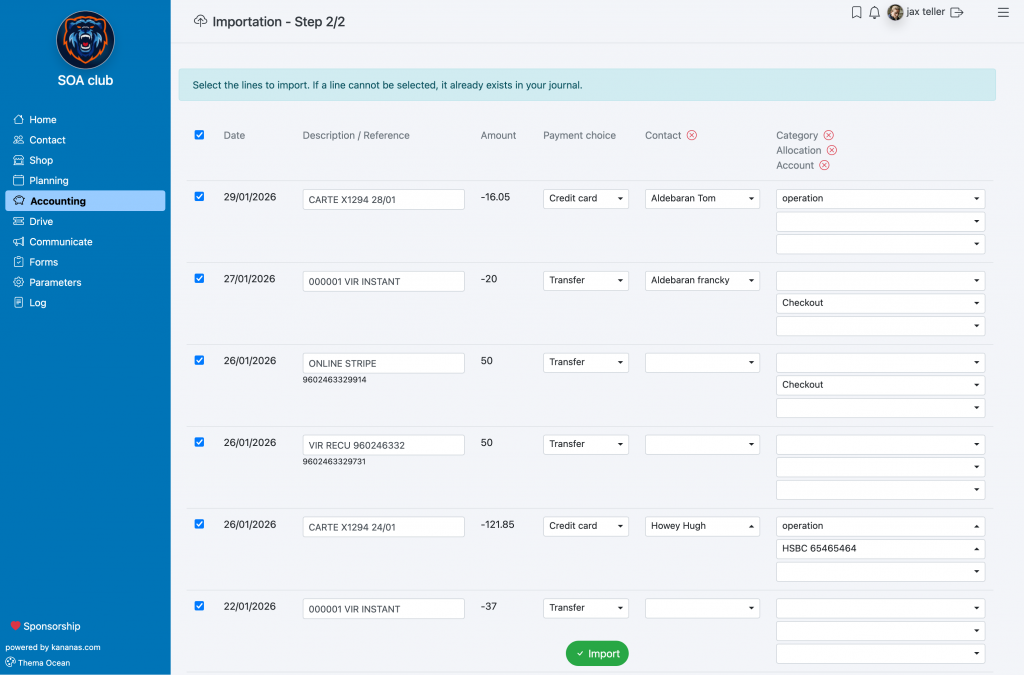
8. Review the suggestions before approval
AI-assisted importing does not replace review by the treasurer or accounting manager.
After the analysis, it is important to review the suggested entries before approving them. If a suggestion is incorrect, you can adjust it before validation.
This step allows your organization to benefit from the time savings provided by AI while maintaining human oversight of its accounting records.
9. Significant time savings for treasurers
Importing bank statements with AI-assisted analysis is particularly useful for nonprofits and membership organizations that want to reduce manual data entry.
Without automated importing, every bank transaction must be copied, classified, assigned to a category, sometimes linked to a contact, and then reviewed.
With Kananas, the bank file is analyzed automatically and the key information is prepared for you.
The treasurer saves time on:
- entering transactions
- identifying transactions
- account classification
- finding associated contacts
- detecting duplicates
- preparing financial reports
This allows the treasurer to spend less time on repetitive tasks and more time reviewing, analyzing, and managing the organization’s finances. AI becomes a valuable assistant for the treasurer.
10. Best practices before importing a bank file
To make your import more reliable, we recommend following these best practices:
- Export a specific date range from your bank, such as one month or one quarter.
- Avoid importing the same date range more than once.
- Keep the original CSV file exported from your bank.
- Verify that all expected transactions are included in the file.
- Approve imported entries gradually, especially during your first imports.
- Correct suggestions when necessary to improve the consistency of future processing.
The more accurate your accounting history is, the more effectively the AI can use previous transactions to suggest relevant accounts, categories, and contacts.
Conclusion
Importing bank statements into Kananas transforms a CSV bank file into accounting transactions that are ready to be reviewed and approved.
Using artificial intelligence, Kananas analyzes transaction descriptions, searches for duplicates, suggests general ledger accounts, classifies transactions by category, and can link certain transactions to contacts in your organization.
This feature provides significant time savings for treasurers and financial managers while preserving the ability to review every entry before approval.
By using the bank import feature regularly, your organization can maintain accounting records that are more current, easier to understand, and easier to use.