
New in Kananas: Manage Prepaid Class Packs and Session Passes!
Do you offer yoga, dance, fitness, sports classes, or workshops? Great news! Kananas now includes a new feature for managing prepaid class packs and session passes.
With this new feature, you can sell 5, 10, or 20-class packs, deduct class credits as members attend sessions, and automatically track how many classes each member has left.
It’s a simpler way to manage your classes and activities, without juggling spreadsheets or paper punch cards.
Flexible Class Packs for Your Activities
Many clubs, nonprofits, and fitness studios offer flexible classes that members can attend whenever their schedules allow.
Instead of paying for each class individually or committing to an annual membership, participants can purchase a prepaid class pack that includes a set number of sessions.
With Kananas, you can now offer:
- 5, 10, or 20-class packs.
- Prepaid packages for yoga, Pilates, dance, or fitness classes.
- Session passes for arts, crafts, and creative workshops.
- Class packs with a specific expiration date.
- Multi-activity passes that can be used across different classes.
Each organization can create its own class packs, customize the number of included sessions, set the price, and define an optional expiration date.
How Does It Work?
Session pass management is fully integrated with the existing Kananas platform, including your product catalog, member records, and activity schedule.
1. Create Class Packs in Your Product Catalog
Go to Shop > Products and create a new class pack by entering its name, price, and number of included sessions.
For example, you can create a “10-Class Yoga Pass” that gives members access to ten yoga sessions.
You can also set an expiration date to limit how long the pass can be used.
2. Sell Class Packs to Your Members
Class packs are sold just like any other product in Kananas.
You can add a class pack directly to a member’s cart or make it available for purchase through your online store.
When a member purchases a pass, Kananas creates an individual session pass linked to their account and records the initial number of available class credits.
3. Deduct Class Credits from Your Schedule
When a member attends a class, simply select their session pass from the attendance record and enter the number of credits to deduct.
Kananas automatically updates the remaining balance when you save the attendance record.
Example: A member purchases a 10-class pass. After attending three classes, using one credit per class, they have 7 sessions remaining.
You can also deduct multiple credits for a single attendance when needed.
Members Can Check Their Remaining Classes Anytime
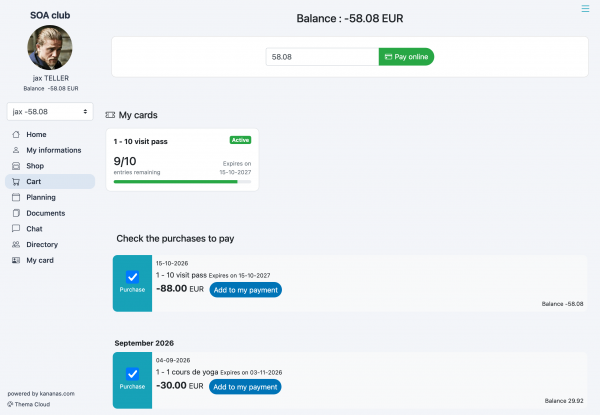
Another great benefit: members can view their class packs directly from their Kananas member portal, whether they’re using a computer or smartphone.
For each pass, members can see:
- The number of remaining classes.
- A visual progress bar showing their available balance.
- The pass expiration date, if applicable.
- The pass status: Active, Exhausted, or Expired.
No more calling or emailing your front desk just to find out how many classes are left!
This added transparency reduces administrative questions and helps members plan their upcoming classes more easily.
Accurate Tracking for Instructors and Administrators
Club managers, instructors, and administrators can also monitor purchased class packs and how they are being used.
From the sales tracking section or an individual member’s cart, authorized staff can check remaining credits and review the history of sessions already used.
Every deduction is linked to a specific activity, date, and number of credits used. If a mistake occurs, administrators can correct the deduction directly from the relevant attendance record. Kananas then recalculates the remaining balance.
Kananas also prevents new deductions from passes that have no remaining credits or have reached their expiration date.
Less Administrative Work, More Time for Your Members
This new feature addresses a common challenge for clubs, nonprofits, fitness studios, and other organizations that offer flexible, pay-as-you-go classes.
With Kananas, you can:
- Centralize class pack management by connecting sales, members, attendance, and session passes.
- Reduce tracking errors with automatic balance calculations.
- Access complete usage history to review past class attendance and deductions.
- Give members more control by allowing them to check their balances through the member portal.
- Eliminate manual tracking with paper punch cards and Excel spreadsheets.
Best of all, there’s no need for another software tool. Session passes work directly with your existing Kananas product catalog, member records, and activity schedule.
Available Now in Kananas!
Session pass and class pack management is now available in Kananas. You can start creating prepaid class packs and offering them to your members today.
We’ve prepared a complete step-by-step tutorial, including screenshots, to guide you through creating, selling, and managing your session passes.
? Learn How to Manage Session Passes and Class Packs in Kananas
With Kananas, spend less time managing class credits and more time supporting your members!
Ready to simplify membership management?
Start with Kananas for free. No credit card required.